Not using Debian 8?
Choose a different version or distribution.
Introduction
Nginx is an popular HTTP-server alternative to Apache2. It can be used as a reverse proxy, mail server, or web server. According to the Netcraft survey as of July 2015, Nginx currently holds 14% of the market and has had an increasing trend since 2007.
In this guide, we will install Nginx on your Debian 8 server.
Prerequisites
To follow this tutorial, you will need:
- One fresh Debian 8.1 Droplet
- A sudo non-root user, which you can setup by following steps 2 and 3 of this tutorial
Unless otherwise noted, all of the commands in this tutorial should be run as a non-root user with sudo privileges.
Step 1 — Install Nginx
In this step, we will use a built-in package installer called apt-get. It simplifies management drastically and facilitates a clean installation.
As part of the prerequisites, you should have updated the apt package index with apt-get and installed the sudo package. Unlike other Linux distributions, Debian 8 does not come with sudo installed.
Nginx is the aforementioned HTTP server, focused on handling large loads with low memory usage. To install it, run the following command:
- sudo apt-get install nginx
For information on the differences between Nginx and Apache2, the two most popular open-source web servers, see this article.
Step 2 — Test Your Web Server
In this step, we will test that your Nginx server is accessible.
In a web browser, access http://your_server_ip, replacing your_server_ip with the IP address of your server. You should see the default Nginx page, confirming that server is up and running.
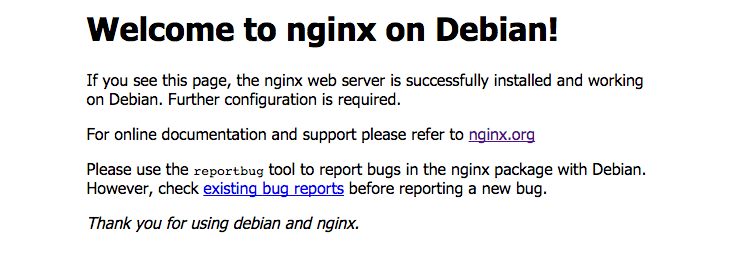
If you do not have access to a web browser, you can still test your server from the command line. It is best to test it from a different system to make sure your website is visible to the outside world. Issue the command:
- curl your_server_ip
You should see the following HTML output.
<!DOCTYPE html>
<html>
<head>
<title>Welcome to nginx on Debian!</title>
<style>
    body {
        width: 35em;
        margin: 0 auto;
        font-family: Tahoma, Verdana, Arial, sans-serif;
    }
</style>
</head>
<body>
<h1>Welcome to nginx on Debian!</h1>
<p>If you see this page, the nginx web server is successfully installed and
working on Debian. Further configuration is required.</p>

<p>For online documentation and support please refer to
<a href="http://nginx.org/">nginx.org</a></p>

<p>
      Please use the <tt>reportbug</tt> tool to report bugs in the
      nginx package with Debian. However, check <a
      href="http://bugs.debian.org/cgi-bin/pkgreport.cgi?ordering=normal;archive=0;src=nginx;repeatmerged=0">existing
      bug reports</a> before reporting a new bug.
</p>

<p><em>Thank you for using debian and nginx.</em></p>


</body>
</html>
An error would have looked like the following. You should not see this.
curl: (52) Empty reply from server
Step 3 — Manage the Nginx Process
Now that you have your web server up and running, we can go over some basic management commands.
To stop your web server, you can type:
- sudo systemctl stop nginx
To start the web server when it is stopped, type:
- sudo systemctl start nginx
To stop and then start the service again, type:
- sudo systemctl restart nginx
If you are simply making configuration changes, Nginx can often reload without dropping connections. To do this, this command can be used:
- sudo systemctl reload nginx
We can make sure that our web server will restart automatically when the server is rebooted by typing:
- sudo systemctl enable nginx
To test that this configuration works, restart your server.
- sudo shutdown -r now
Then logout, as the server is now restarting.
After a minute or two, you may repeat Step 2 to test that your web server starts on reboot.
Server Root and Configuration
If you want to start serving your own pages or application through Nginx, you will want to know the locations of the Nginx configuration files and default server root directory.
Default Server Root
The default server root directory is /var/www/html. Files that are placed in this directory will be served on your web server. This location is specified in the default server block configuration file that ships with Nginx, which is located at /etc/nginx/sites-enabled/default.
Server Block Configuration
Any additional server blocks, known as Virtual Hosts in Apache, can be added by creating new configuration files in /etc/nginx/sites-available. To activate these configurations, create a symbolic link to /etc/nginx/sites-enabled, using the following:
- sudo ln -s /etc/nginx/sites-available/site /etc/nginx/sites-enabled/site
All configuration files in the sites-enabled directory will be loaded by Nginx.
Nginx Global Configuration
The main Nginx configuration file is located at /etc/nginx/nginx.conf. This is where you can change settings like the user that runs the Nginx daemon processes, and the number of worker processes that get spawned when Nginx is running, among other things.
Conclusion
Now that you have your web server installed, you have many options for the type of content to serve and the technologies you want to use to create a richer experience.
You may also want to explore additional options to secure your server. Remember that it is now open to the world wide web and is extremely vulnerable.
Thanks for learning with the DigitalOcean Community. Check out our offerings for compute, storage, networking, and managed databases.
About the author(s)

I'm a diglot by definition, lactose intolerant by birth but an ice-cream lover at heart. Call me wabbly, witling, whatever you will, but I go by Alvin

Technical Editor, DigitalOcean
Still looking for an answer?
 This work is licensed under a Creative Commons Attribution-NonCommercial- ShareAlike 4.0 International License.
Become a contributor for community
Get paid to write technical tutorials and select a tech-focused charity to receive a matching donation.

DigitalOcean Documentation
Full documentation for every DigitalOcean product.

Resources for startups and AI-native businesses
The Wave has everything you need to know about building a business, from raising funding to marketing your product.
The developer cloud
Scale up as you grow — whether you're running one virtual machine or ten thousand.

Start building today
From GPU-powered inference and Kubernetes to managed databases and storage, get everything you need to build, scale, and deploy intelligent applications.



