
By Erika Heidi
Developer Advocate
Not using CentOS 8?
Choose a different version or distribution.
Introduction
Nginx is one of the most popular web servers in the world and is responsible for hosting some of the largest and most popular sites on the internet. It is more resource-friendly than Apache in most cases and can be used as a web server or reverse proxy.
In this guide, we’ll discuss how to install Nginx on a CentOS 8 server.
Prerequisites
To follow this guide, you’ll need access to a CentOS 8 server as a non-root user with sudo privileges, and an active firewall installed on your server. To set this up, you can follow our Initial Server Setup Guide for CentOS 8.
Step 1 — Installing the Nginx Web Server
In order to install Nginx, we’ll use the dnf package manager, which is the new default package manager on CentOS 8.
Install the nginx package with:
- sudo dnf install nginx
When prompted, enter y to confirm that you want to install nginx. After that, dnf will install Nginx and any required dependencies to your server.
After the installation is finished, run the following commands to enable and start the server:
- sudo systemctl enable nginx
- sudo systemctl start nginx
This will make Nginx start at system boot.
Step 2 — Adjusting Firewall Rules
In case you have enabled the firewalld firewall as instructed in our initial server setup guide for CentOS 8, you will need to adjust the firewall settings in order to allow external connections on your Nginx web server, which runs on port 80 by default.
Run the following command to permanently enable HTTP connections on port 80:
- sudo firewall-cmd --permanent --add-service=http
To verify that the http firewall service was added correctly, you can run:
- sudo firewall-cmd --permanent --list-all
You’ll see output like this:
Outputpublic
  target: default
  icmp-block-inversion: no
  interfaces:
  sources:
  services: cockpit dhcpv6-client http ssh
  ports:
  protocols:
  masquerade: no
  forward-ports:
  source-ports:
  icmp-blocks:
  rich rules:
To apply the changes, you’ll need to reload the firewall service:
- sudo firewall-cmd --reload
Now your Nginx server is fully installed and ready to be accessed by external visitors.
Step 3 — Checking your Web Server
You can now test if your Nginx web server is up and running by accessing your server’s public IP address or domain name from your web browser.
Note: In case you are using DigitalOcean as your DNS hosting provider, you can check our product docs for detailed instructions on how to set up a new domain name and point it to your server.
If you do not have a domain name pointed at your server and you do not know your server’s public IP address, you can find it by running the following command:
- ip addr show eth0 | grep inet | awk '{ print $2; }' | sed 's/\/.*$//'
This will print out a few IP addresses. You can try each of them in turn in your web browser.
As an alternative, you can check which IP address is accessible, as viewed from other locations on the internet:
- curl -4 icanhazip.com
Type the address that you receive in your web browser and it will take you to Nginx’s default landing page:
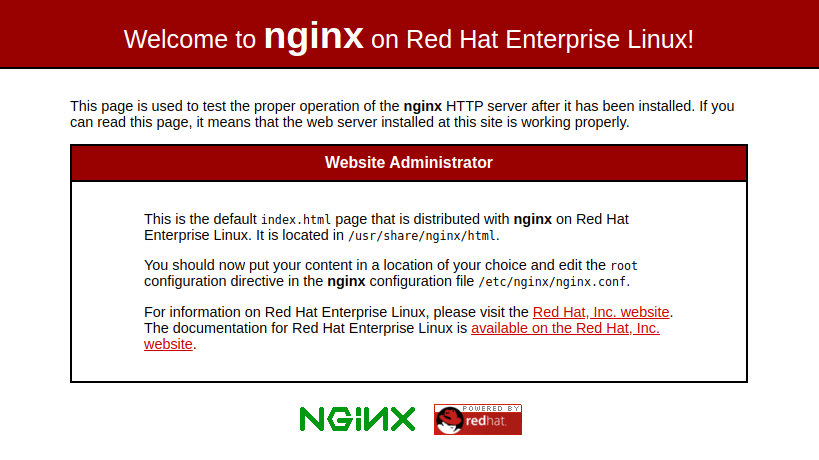
If you see this page, then your web server is now correctly installed.
Step 4 – Managing the Nginx Process
Now that you have your web server up and running, we’ll review how to manage the Nginx service through systemctl.
Whenever you need to stop your web server, you can use:
- sudo systemctl stop nginx
To start the web server when it is stopped, type:
- sudo systemctl start nginx
To stop and then start the service again, you can use:
- sudo systemctl restart nginx
Nginx can also reload configuration changes without dropping connections. To do this, type:
- sudo systemctl reload nginx
By default, Nginx is configured to start automatically when the server boots. If this is not what you wish, you can disable this behavior by typing:
- sudo systemctl disable nginx
To re-enable the service and make Nginx start at boot again, you can use:
- sudo systemctl enable nginx
Step 5 – Getting Familiar with Important Nginx Files and Directories
Now that you know how to manage the Nginx service, you should take a few minutes to familiarize yourself with a few important directories and files.
Content
/usr/share/nginx/html: The actual web content, which by default only consists of the default Nginx page you saw earlier, is served out of the/usr/share/nginx/htmldirectory. This can be changed by altering Nginx configuration files.
Server Configuration
/etc/nginx: The Nginx configuration directory. All of the Nginx configuration files reside here./etc/nginx/nginx.conf: The main Nginx configuration file. This can be modified to make changes to the Nginx global configuration./etc/nginx/conf.d/: This directory contains server block configuration files, where you can define the websites that are hosted within Nginx. A typical approach is to have each website in a separate file that is named after the website’s domain name, such asyour_domain.conf.
Server Logs
/var/log/nginx/access.log: Every request to your web server is recorded in this log file unless Nginx is configured to do otherwise./var/log/nginx/error.log: Any Nginx errors will be recorded in this log.
Step 6 – Setting Up Server Blocks (Optional)
In case you’d like to host multiple websites within the same Nginx web server, you’ll need to set up server blocks. Nginx server blocks work in a similar way to Apache virtual hosts, allowing a single server to respond to multiple domain names and serving different content for each of them. On CentOS 8, server blocks are defined in .conf files located at /etc/nginx/conf.d.
We will set up a server block for a domain called your_domain. To learn more about setting up a domain name with DigitalOcean, see our introduction to DigitalOcean DNS.
By default, Nginx on CentOS 8 is configured to serve documents out of a directory at /usr/share/nginx/html. While this works well for a single site, it can become unmanageable if you are hosting multiple sites. Instead of modifying /usr/share/nginx/html, we’ll create a directory structure within /var/www for the your_domain website, leaving /usr/share/nginx/html in place as the default directory to be served if a client request doesn’t match any other sites.
Create the directory for your_domain as follows, using the -p flag to create any necessary parent directories:
- sudo mkdir -p /var/www/your_domain/html
Next, assign ownership of the directory with the $USER environment variable, which should reference your current system user:
- sudo chown -R $USER:$USER /var/www/your_domain/html
Next, we’ll create a sample index.html page to test the server block configuration. The default text editor that comes with CentOS 8 is vi. vi is an extremely powerful text editor, but it can be somewhat obtuse for users who lack experience with it. You might want to install a more user-friendly editor such as nano to facilitate editing configuration files on your CentOS 8 server:
- sudo dnf install nano
Now you can use nano to create the sample index.html file:
- nano /var/www/your_domain/html/index.html
Inside that file, add the following HTML code:
<html>
    <head>
        <title>Welcome to your_domain</title>
    </head>
    <body>
        <h1>Success! Your Nginx server is successfully configured for <em>your_domain</em>. </h1>
<p>This is a sample page.</p>
    </body>
</html>
Save and close the file when you are finished. If you used nano, you can do so by pressing CTRL + X, Y, then ENTER.
In order for Nginx to serve this content, we need to create a server block with the correct directives that point to our custom web root. We’ll create a new server block at /etc/nginx/conf.d/your_domain.conf:
- sudo nano /etc/nginx/conf.d/your_domain.conf
Paste in the following configuration block:
server {
        listen 80;
        listen [::]:80;

        root /var/www/your_domain/html;
        index index.html index.htm index.nginx-debian.html;

        server_name your_domain www.your_domain;

        location / {
                try_files $uri $uri/ =404;
        }
}
Save and close the file when you’re done editing its content.
To make sure that there are no syntax errors in any of your Nginx files, run:
- sudo nginx -t
If there aren’t any problems, you will see the following output:
Outputnginx: the configuration file /etc/nginx/nginx.conf syntax is ok
nginx: configuration file /etc/nginx/nginx.conf test is successful
Once your configuration test passes, restart Nginx to enable your changes:
- sudo systemctl restart nginx
Before you can test the changes from your browser, you’ll need to update your server’s SELinux security contexts so that Nginx is allowed to serve content from the /var/www/your_domain directory.
The following command will allow your custom document root to be served as HTTP content:
- chcon -vR system_u:object_r:httpd_sys_content_t:s0 /var/www/your_domain/
Now you can test your custom domain setup by navigating to http://your_domain, where you will see something like this:

This page is rendering the HTML code we’ve defined in the custom document root created for the server block. If you’re able to see this page, it means your Nginx server is correctly configured to serve your domain.
Conclusion
In this guide, we’ve seen how to install and set up Nginx, a high-performance web server and reverse proxy. We reviewed how to manage the Nginx service running on your server, and what are the main directories used by Nginx to store configuration files, content, and logs.
From here, you have many options for the type of content and the technologies that you might want to use in the websites hosted within your web server.
Thanks for learning with the DigitalOcean Community. Check out our offerings for compute, storage, networking, and managed databases.
About the author
Dev/Ops passionate about open source, PHP, and Linux. Former Senior Technical Writer at DigitalOcean. Areas of expertise include LAMP Stack, Ubuntu, Debian 11, Linux, Ansible, and more.
Still looking for an answer?
 This work is licensed under a Creative Commons Attribution-NonCommercial- ShareAlike 4.0 International License.
Become a contributor for community
Get paid to write technical tutorials and select a tech-focused charity to receive a matching donation.

DigitalOcean Documentation
Full documentation for every DigitalOcean product.

Resources for startups and AI-native businesses
The Wave has everything you need to know about building a business, from raising funding to marketing your product.
The developer cloud
Scale up as you grow — whether you're running one virtual machine or ten thousand.

Start building today
From GPU-powered inference and Kubernetes to managed databases and storage, get everything you need to build, scale, and deploy intelligent applications.



