
By Erika Heidi
Developer Advocate
Not using Ubuntu 18.04?
Choose a different version or distribution.
Introduction
While many users need the functionality of a database system like MySQL, interacting with the system solely from the MySQL command-line client requires familiarity with the SQL language, so it may not be the preferred interface for some.
phpMyAdmin was created so that users can interact with MySQL through an intuitive web interface, running alongside a PHP development environment. In this guide, we’ll discuss how to install phpMyAdmin on top of an Nginx server, and how to configure the server for increased security.
Note: There are important security considerations when using software like phpMyAdmin, since it runs on the database server, it deals with database credentials, and it enables a user to easily execute arbitrary SQL queries into your database. Because phpMyAdmin is a widely-deployed PHP application, it is frequently targeted for attack. We will go over some security measures you can take in this tutorial so that you can make informed decisions.
Prerequisites
Before you get started with this guide, you’ll need the following available to you:
- An Ubuntu 18.04 server running a LEMP (Linux, Nginx, MySQL and PHP) stack secured with
ufw, as described in the initial server setup guide for Ubuntu 18.04. If you haven’t set up your server yet, you can follow the guide on installing a LEMP stack on Ubuntu 18.04. - Access to this server as a non-root user with
sudoprivileges.
Because phpMyAdmin handles authentication using MySQL credentials, it is strongly advisable to install an SSL/TLS certificate to enable encrypted traffic between server and client. If you do not have an existing domain configured with a valid certificate, you can follow this guide on securing Nginx with Let’s Encrypt on Ubuntu 18.04.
Warning: If you don’t have an SSL/TLS certificate installed on the server and you still want to proceed, please consider enforcing access via SSH Tunnels as explained in Step 5 of this guide.
Once you have met these prerequisites, you can go ahead with the rest of the guide.
Step 1 — Installing phpMyAdmin
The first thing we need to do is install phpMyAdmin on the LEMP server. We’re going to use the default Ubuntu repositories to achieve this goal.
Let’s start by updating the server’s package index with:
- sudo apt update
Now you can install phpMyAdmin with:
- sudo apt install phpmyadmin
During the installation process, you will be prompted to choose the web server (either Apache or Lighttpd) to configure. Because we are using Nginx as a web server, we shouldn’t make a choice here. Press tab and then OK to advance to the next step.
Next, you’ll be prompted whether to use dbconfig-common for configuring the application database. Select Yes. This will set up the internal database and administrative user for phpMyAdmin. You will be asked to define a new password for the phpmyadmin MySQL user. You can also leave it blank and let phpMyAdmin randomly create a password.
The installation will now finish. For the Nginx web server to find and serve the phpMyAdmin files correctly, we’ll need to create a symbolic link from the installation files to Nginx’s document root directory:
- sudo ln -s /usr/share/phpmyadmin /var/www/html/phpmyadmin
Your phpMyAdmin installation is now operational. To access the interface, go to your server’s domain name or public IP address followed by /phpmyadmin in your web browser:
https://server_domain_or_IP/phpmyadmin
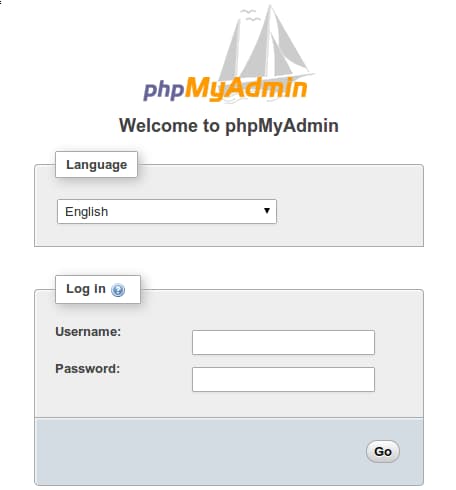
As mentioned before, phpMyAdmin handles authentication using MySQL credentials, which means you should use the same username and password you would normally use to connect to the database via console or via an API. If you need help creating MySQL users, check this guide on How To Manage an SQL Database.
Note: Logging into phpMyAdmin as the root MySQL user is discouraged because it represents a significant security risk. We’ll see how to disable root login in a subsequent step of this guide.
Your phpMyAdmin installation should be completely functional at this point. However, by installing a web interface, we’ve exposed our MySQL database server to the outside world. Because of phpMyAdmin’s popularity, and the large amounts of data it may provide access to, installations like these are common targets for attacks. In the following sections of this guide, we’ll see a few different ways in which we can make our phpMyAdmin installation more secure.
Step 2 — Changing phpMyAdmin’s Default Location
One of the most basic ways to protect your phpMyAdmin installation is by making it harder to find. Bots will scan for common paths, like phpmyadmin, pma, admin, mysql and such. Changing the interface’s URL from /phpmyadmin to something non-standard will make it much harder for automated scripts to find your phpMyAdmin installation and attempt brute-force attacks.
With our phpMyAdmin installation, we’ve created a symbolic link pointing to /usr/share/phpmyadmin, where the actual application files are located. To change phpMyAdmin’s interface URL, we will rename this symbolic link.
First, let’s navigate to the Nginx document root directory and list the files it contains to get a better sense of the change we’ll make:
- cd /var/www/html/
- ls -l
You’ll receive the following output:
Outputtotal 8
-rw-r--r-- 1 root root 612 Apr  8 13:30 index.nginx-debian.html
lrwxrwxrwx 1 root root  21 Apr  8 15:36 phpmyadmin -> /usr/share/phpmyadmin
The output shows that we have a symbolic link called phpmyadmin in this directory. We can change this link name to whatever we’d like. This will in turn change phpMyAdmin’s access URL, which can help obscure the endpoint from bots hardcoded to search common endpoint names.
Choose a name that obscures the purpose of the endpoint. In this guide, we’ll name our endpoint /nothingtosee, but you should choose an alternate name. To accomplish this, we’ll rename the link:
- sudo mv phpmyadmin nothingtosee
- ls -l
After running the above commands, you’ll receive this output:
Outputtotal 8
-rw-r--r-- 1 root root 612 Apr  8 13:30 index.nginx-debian.html
lrwxrwxrwx 1 root root  21 Apr  8 15:36 nothingtosee -> /usr/share/phpmyadmin
Now, if you go to the old URL, you’ll get a 404 error:
https://server_domain_or_IP/phpmyadmin
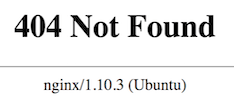
Your phpMyAdmin interface will now be available at the new URL we just configured:
https://server_domain_or_IP/nothingtosee
By obfuscating phpMyAdmin’s real location on the server, you’re securing its interface against automated scans and manual brute-force attempts.
Step 3 — Disabling Root Login
On MySQL as well as within regular Linux systems, the root account is a special administrative account with unrestricted access to the system. In addition to being a privileged account, it’s a known login name, which makes it an obvious target for brute-force attacks. To minimize risks, we’ll configure phpMyAdmin to deny any login attempts coming from the user root. This way, even if you provide valid credentials for the user root, you’ll still get an “access denied” error and won’t be allowed to log in.
Because we chose to use dbconfig-common to configure and store phpMyAdmin settings, the default configuration is currently stored in the database. We’ll need to create a new config.inc.php file to define our custom settings.
Even though the PHP files for phpMyAdmin are located inside /usr/share/phpmyadmin, the application uses configuration files located at /etc/phpmyadmin. We will create a new custom settings file inside /etc/phpmyadmin/conf.d, and name it pma_secure.php:
- sudo nano /etc/phpmyadmin/conf.d/pma_secure.php
The following configuration file contains the necessary settings to disable passwordless logins (AllowNoPassword set to false) and root login (AllowRoot set to false):
<?php

# PhpMyAdmin Settings
# This should be set to a random string of at least 32 chars
$cfg['blowfish_secret'] = '3!#32@3sa(+=_4?),5XP_:U%%8\34sdfSdg43yH#{o';

$i=0;
$i++;

$cfg['Servers'][$i]['auth_type'] = 'cookie';
$cfg['Servers'][$i]['AllowNoPassword'] = false;
$cfg['Servers'][$i]['AllowRoot'] = false;

?>
Save the file when you’re done editing by pressing CTRL + X then y to confirm changes and ENTER. The changes will apply automatically. If you reload the login page now and try to log in as root, you will get an Access Denied error:
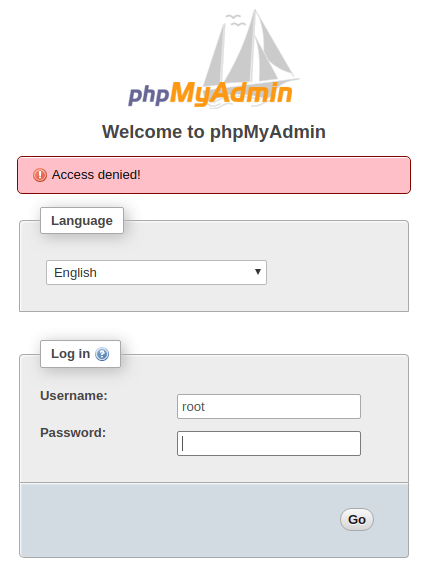
Root login is now prohibited on your phpMyAdmin installation. This security measure will block brute-force scripts from trying to guess the root database password on your server. Moreover, it will enforce the usage of less-privileged MySQL accounts for accessing phpMyAdmin’s web interface, which by itself is an important security practice.
##Step 4 — Creating an Authentication Gateway
Hiding your phpMyAdmin installation on an unusual location might sidestep some automated bots scanning the network, but it’s useless against targeted attacks. To better protect a web application with restricted access, it’s generally more effective to stop attackers before they can even reach the application. This way, they’ll be unable to use generic exploits and brute-force attacks to guess access credentials.
In the specific case of phpMyAdmin, it’s even more important to keep the login interface locked away. By keeping it open to the world, you’re offering a brute-force platform for attackers to guess your database credentials.
Adding an extra layer of authentication to your phpMyAdmin installation enables you to increase security. Users will be required to pass through an HTTP authentication prompt before ever seeing the phpMyAdmin login screen. Most web servers, including Nginx, provide this capability natively.
To set this up, we first need to create a password file to store the authentication credentials. Nginx requires that passwords be encrypted using the crypt() function. The OpenSSL suite, which should already be installed on your server, includes this functionality.
To create an encrypted password, type:
- openssl passwd
You will be prompted to enter and confirm the password that you wish to use. The utility will then display an encrypted version of the password that will look something like this:
OutputO5az.RSPzd.HE
Copy this value, as you will need to paste it into the authentication file we’ll be creating.
Now, create an authentication file. We’ll call this file pma_pass and place it in the Nginx configuration directory:
- sudo nano /etc/nginx/pma_pass
In this file, you’ll specify the username you would like to use, followed by a colon (:), followed by the encrypted version of the password you received from the openssl passwd utility.
We are going to name our user sammy, but you should choose a different username. The file should look like this:
sammy:O5az.RSPzd.HE
Save and close the file when you’re done.
Now we’re ready to modify the Nginx configuration file. For this guide, we’ll use the configuration file located at /etc/nginx/sites-available/example.com. You should use the relevant Nginx configuration file for the web location where phpMyAdmin is currently hosted. Open this file in your text editor to get started:
- sudo nano /etc/nginx/sites-available/example.com
Locate the server block, and the location / section within it. We need to create a new location section within this block to match phpMyAdmin’s current path on the server. In this guide, phpMyAdmin’s location relative to the web root is /nothingtosee:
server {
	. . .

    	location / {
            	try_files $uri $uri/ =404;
    	}

    	location ^~ /nothingtosee/ {
            	# Settings for phpMyAdmin will go here
    	}

	. . .
}
Within this block, we’ll need to set up two different directives: auth_basic, which defines the message that will be displayed on the authentication prompt, and auth_basic_user_file, pointing to the file we just created.
server {
	. . .

    	location ^~ /nothingtosee/ {
        	auth_basic "Admin Login";
        	auth_basic_user_file /etc/nginx/pma_pass;

    	}
	. . .
}
Lastly, notice that this block has a ^~ selector before the new location definition. This is to make sure Nginx won’t bypass our access rules when it matches the rule for PHP files, which are typically defined as a regular expression to catch all .php files. In Nginx configuration files, regular expression definitions have a higher preference over standard location definitions, so if we don’t use the ^~ selector at the beginning of the location, users will still be able to bypass the authentication prompt by navigating to http://example.com/nothingtosee/index.php in their browser.
The ^~ selector at the beginning of the location definition tells Nginx to ignore other matches when it finds a match for this location. This means that any subdirectories or files within /nothingtosee/ will be matched with this rule. However, because the definition to parse PHP files will be skipped as a result of the ^~ selector usage, we’ll need to include a new PHP location block inside the /nothingtosee definition. This will make sure PHP files inside this location are properly parsed, otherwise they will be sent to the browser as download content.
This is how your configuration file should look after adding the inner PHP location block:
server {
	. . .

    	location ^~ /nothingtosee/ {
          auth_basic "Admin Login";
          auth_basic_user_file /etc/nginx/pma_pass;

          location ~ \.php$ {
                include snippets/fastcgi-php.conf;
                fastcgi_pass unix:/var/run/php/php7.2-fpm.sock;
          }

    	}
	. . .
}
Remember to replace nothingtosee with the actual path where phpMyAdmin can be found. You should also double check the location of your PHP-FPM socket file, which will vary depending on your currently installed PHP version. In this example, we use the php7.2-fpm.sock that is valid for PHP 7.2, the version that is installed on Ubuntu 18.04 via default apt repositories.
Save and close the file when you’re done. To check if the configuration file is valid, you can run:
- sudo nginx -t
The following output is expected:
Outputnginx: the configuration file /etc/nginx/nginx.conf syntax is ok
nginx: configuration file /etc/nginx/nginx.conf test is successful
To activate the new authentication gate, you must reload the web server:
- sudo systemctl reload nginx
Now, if you visit the phpMyAdmin URL in your web browser, you should be prompted for the username and password you added to the pma_pass file:
https://server_domain_or_IP/nothingtosee
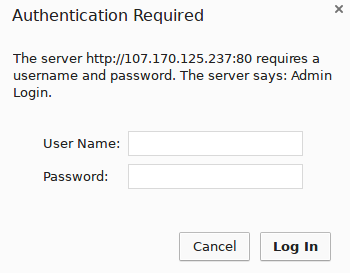
Once you enter your credentials, you’ll be taken to the standard phpMyAdmin login page.
Note: If refreshing the page does not work, you may have to clear your cache or use a different browser session if you’ve already been using phpMyAdmin.
In addition to providing an extra layer of security, this gateway will help keep your MySQL logs clean of spammy authentication attempts.
##Step 5 — Setting Up Access via Encrypted Tunnels (Optional)
For increased security, it is possible to lock down your phpMyAdmin installation to authorized hosts only. You can whitelist authorized hosts in your Nginx configuration file, so that any request coming from an IP address that is not on the list will be denied.
Even though this feature alone can be enough in some use cases, it’s not always the best long-term solution, mainly due to the fact that most people don’t access the Internet from static IP addresses. As soon as you get a new IP address from your Internet provider, you’ll be unable to get to the phpMyAdmin interface until you update the Nginx configuration file with your new IP address.
For a more robust long-term solution, you can use IP-based access control to create a setup in which users will only have access to your phpMyAdmin interface if they’re accessing from either an authorized IP address or localhost via SSH tunneling. We’ll see how to set this up in the sections below.
Combining IP-based access control with SSH tunneling greatly increases security because it fully blocks access coming from the public internet (except for authorized IPs), in addition to providing a secure channel between user and server through the use of encrypted tunnels.
Setting Up IP-Based Access Control on Nginx
On Nginx, IP-based access control can be defined in the corresponding location block of a given site, using the directives allow and deny. For instance, if we want to only allow requests coming from a given host, we should include the following two lines, in this order, inside the relevant location block for the site we would like to protect:
allow hostname_or_IP;
deny all;
You can allow as many hosts as you want, you only need to include one allow line for each authorized host/IP inside the respective location block for the site you’re protecting. The directives will be evaluated in the same order as they are listed, until a match is found or the request is finally denied due to the deny all directive.
We’ll now configure Nginx to only allow requests coming from localhost or your current IP address. First, you’ll need to know the current public IP address your local machine is using to connect to the Internet. There are various ways to obtain this information; for simplicity, we’re going to use the service provided by ipinfo.io. You can either open the URL https://ipinfo.io/ip in your browser, or run the following command from your local machine:
- curl https://ipinfo.io/ip
You should get a simple IP address as output, like this:
Output203.0.113.111
That is your current public IP address. We’ll configure phpMyAdmin’s location block to only allow requests coming from that IP, in addition to localhost. We’ll need to edit once again the configuration block for phpMyAdmin inside /etc/nginx/sites-available/example.com.
Open the Nginx configuration file using your command-line editor of choice:
- sudo nano /etc/nginx/sites-available/example.com
Because we already have an access rule within our current configuration, we need to combine it with IP-based access control using the directive satisfy all. This way, we can keep the current HTTP authentication prompt for increased security.
This is how your phpMyAdmin Nginx configuration should look like after you’re done editing:
server {
	. . .

	location ^~ /nothingtosee/ {
    	    satisfy all; #requires both conditions

    	    allow 203.0.113.111; #allow your IP
    	    allow 127.0.0.1; #allow localhost via SSH tunnels
    	    deny all; #deny all other sources

    	    auth_basic "Admin Login";
    	    auth_basic_user_file /etc/nginx/pma_pass;

    	    location ~ \.php {
        	  include snippets/fastcgi-php.conf;
        	  fastcgi_pass unix:/var/run/php/php7.2-fpm.sock;
    	    }
	}

	. . .
}
Remember to replace nothingtosee with the actual path where phpMyAdmin can be found, and the highlighted IP address with your current public IP address.
Save and close the file when you’re done. To check if the configuration file is valid, you can run:
- sudo nginx -t
The following output is expected:
Outputnginx: the configuration file /etc/nginx/nginx.conf syntax is ok
nginx: configuration file /etc/nginx/nginx.conf test is successful
Now reload the web server so the changes take effect:
- sudo systemctl reload nginx
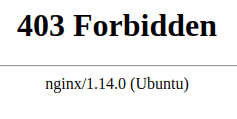
Because your IP address is explicitly listed as an authorized host, your access shouldn’t be disturbed. Anyone else trying to access your phpMyAdmin installation will now get a 403 error (Forbidden):
https://server_domain_or_IP/nothingtosee
In the next section, we’ll see how to use SSH tunneling to access the web server through local requests. This way, you’ll still be able to access phpMyAdmin’s interface even when your IP address changes.
Accessing phpMyAdmin Through an Encrypted Tunnel
SSH tunneling works as a way of redirecting network traffic through encrypted channels. By running an ssh command similar to what you would use to log into a server, you can create a secure “tunnel” between your local machine and that server. All traffic coming in on a given local port can now be redirected through the encrypted tunnel and use the remote server as a proxy, before reaching out to the internet. It’s similar to what happens when you use a VPN (Virtual Private Network), however SSH tunneling is much simpler to set up.
We’ll use SSH tunneling to proxy our requests to the remote web server running phpMyAdmin. By creating a tunnel between your local machine and the server where phpMyAdmin is installed, you can redirect local requests to the remote web server, and what’s more important, traffic will be encrypted and requests will reach Nginx as if they’re coming from localhost. This way, no matter what IP address you’re connecting from, you’ll be able to securely access phpMyAdmin’s interface.
Because the traffic between your local machine and the remote web server will be encrypted, this is a safe alternative for situations where you can’t have an SSL/TLS certificate installed on the web server running phpMyAdmin.
From your local machine, run this command whenever you need access to phpMyAdmin:
- ssh user@server_domain_or_IP -L 8000:localhost:80 -L 8443:localhost:443 -N
Let’s examine each part of the command:
- user: SSH user to connect to the server where phpMyAdmin is running
- hostname_or_IP: SSH host where phpMyAdmin is running
- -L 8000:localhost:80 redirects HTTP traffic on port 8000
- -L 8443:localhost:443 redirects HTTPS traffic on port 8443
- -N: do not execute remote commands
Note: This command will block the terminal until interrupted with a CTRL+C, in which case it will end the SSH connection and stop the packet redirection. If you’d prefer to run this command in background mode, you can use the SSH option -f.
Now, go to your browser and replace server_domain_or_IP with localhost:PORT, where PORT is either 8000 for HTTP or 8443 for HTTPS:
http://localhost:8000/nothingtosee
https://localhost:443/nothingtosee
Note: If you’re accessing phpMyAdmin via https, you might get an alert message questioning the security of the SSL certificate. This happens because the domain name you’re using (localhost) doesn’t match the address registered within the certificate (domain where phpMyAdmin is actually being served). It is safe to proceed.
All requests on localhost:8000 (HTTP) and localhost:8443 (HTTPS) are now being redirected through a secure tunnel to your remote phpMyAdmin application. Not only have you increased security by disabling public access to your phpMyAdmin, you also protected all traffic between your local computer and the remote server by using an encrypted tunnel to send and receive data.
If you’d like to enforce the usage of SSH tunneling to anyone who wants access to your phpMyAdmin interface (including you), you can do that by removing any other authorized IPs from the Nginx configuration file, leaving 127.0.0.1 as the only allowed host to access that location. Considering nobody will be able to make direct requests to phpMyAdmin, it is safe to remove HTTP authentication in order to simplify your setup. This is how your configuration file would look like in such a scenario:
server {
   . . .

   location ^~ /nothingtosee/ {

   	allow 127.0.0.1; #allow localhost only
   	deny all; #deny all other sources

   	location ~ \.php {
       	include snippets/fastcgi-php.conf;
       	fastcgi_pass unix:/var/run/php/php7.2-fpm.sock;
   	}
   }

   . . .
}
Once you reload Nginx’s configuration with sudo systemctl reload nginx, your phpMyAdmin installation will be locked down and users will be required to use SSH tunnels in order to access phpMyAdmin’s interface via redirected requests.
Conclusion
In this tutorial, we saw how to install phpMyAdmin on Ubuntu 18.04 running Nginx as the web server. We also covered advanced methods to secure a phpMyAdmin installation on Ubuntu, such as disabling root login, creating an extra layer of authentication, and using SSH tunneling to access a phpMyAdmin installation via local requests only.
After completing this tutorial, you should be able to manage your MySQL databases from a reasonably secure web interface. This user interface exposes most of the functionality available via the MySQL command line. You can browse databases and schema, execute queries, and create new data sets and structures.
Thanks for learning with the DigitalOcean Community. Check out our offerings for compute, storage, networking, and managed databases.
About the author
Dev/Ops passionate about open source, PHP, and Linux. Former Senior Technical Writer at DigitalOcean. Areas of expertise include LAMP Stack, Ubuntu, Debian 11, Linux, Ansible, and more.
Still looking for an answer?
 This work is licensed under a Creative Commons Attribution-NonCommercial- ShareAlike 4.0 International License.
Become a contributor for community
Get paid to write technical tutorials and select a tech-focused charity to receive a matching donation.

DigitalOcean Documentation
Full documentation for every DigitalOcean product.

Resources for startups and AI-native businesses
The Wave has everything you need to know about building a business, from raising funding to marketing your product.
The developer cloud
Scale up as you grow — whether you're running one virtual machine or ten thousand.

Start building today
From GPU-powered inference and Kubernetes to managed databases and storage, get everything you need to build, scale, and deploy intelligent applications.



