AWS Support Response Times Decoded for Developers in 2026

By Jess Lulka
Content Marketing Manager
- Updated:
- 18 min read
Whenever you have a service outage or incident, time is of the essence—especially for customer-facing products or mission-critical infrastructure. But one thing that can make the process more frustrating is not knowing how quickly the issue can potentially be resolved and having to wait to get an effective resolution from your support provider. This is particularly important if you use Amazon Web Services (AWS), as understanding AWS support response times is crucial to ensure you receive the necessary and timely assistance for your business needs.
AWS support response times are based on initial contact, not instant fixes. The clock measures how quickly an AWS engineer engages with you, not how long it takes to fully resolve the issue. In real-world situations, the nature of a first response is more about gathering context, confirming impact, and setting next steps. The speed at which things move in subsequent interactions depends on the system’s complexity, the architecture involved, and the rate at which information can be shared. Having a full understanding of how AWS support works, its individual tier offerings, and standard response times can help set your own expectations and help you navigate the complexity of AWS Support.
Key takeaways:
-
Basic AWS support is available for all Amazon product users. This includes varying levels of round-the-clock customer service, documentation, technical papers, and support forums. Additional paid tiers offer higher service levels that scale to your organization’s needs.
-
Paid AWS support is designed for enterprises and companies that are heavily invested in the AWS ecosystem.
-
The support plan that is best for your organization depends on the AWS products you use, workload requirements, and budget. Available plans include Business Support+, Enterprise, and Unified Operations.
-
AWS alternatives (for both computing and support) include DigitalOcean, Google Cloud Platform, and Microsoft Azure.
AWS support: response vs. resolution time
When evaluating support plans for cloud providers, two main considerations are response time and resolution time. Understanding the difference between them is essential for setting proper expectations:
Response time refers to the duration between when an IT ticket or support request is submitted and when someone begins working on your request. AWS refers to response time on their support webpage, which ranges from less than 24 hours to less than 5 minutes, depending on your support plan and the request type.
Resolution time refers to the total amount of time spent working on your request. This includes all conversations, information gathering, and troubleshooting. Resolution time can vary depending on the issue, and while some cloud providers offer general guidelines and timing averages to set expectations, AWS does not have any listed average support resolution times.
As a result, it’s important to understand that any AWS support SLAs (for example, a response time of 1 hour) refer to when your issue is initially addressed, not the actual resolution time, which is likely to be longer.
AWS support incident severity levels
When it comes to incident classification, AWS uses low, normal, high, urgent, and critical tags. The average response time will depend on your support plan target and the type of guidance you require.
Within the AWS support escalation process, you can update the severity level on your original ticket or contact your dedicated support specialists, who are available to assist with the Enterprise and Unified Operations Plans. Here are some guidelines for incident severity and response times:
| Severity level | API severity code | When to use it | Listed response target | General guidance |
|---|---|---|---|---|
| low | low | “How do I configure this service?”, architectural questions, feature clarification, or non-urgent development guidance with no production impact | ≤ 24 hours | System impaired |
| normal | normal | A non-critical component is degraded (e.g., background jobs running slower, minor performance issues in a staging or secondary system) | ≤ 12 hours | Production system impaired |
| high | high | A production system is running but degraded (e.g., increased latency, partial feature failures affecting users) | ≤ 4 hours | Production system impaired |
| urgent | urgent | A production application or service is unavailable, and customers are impacted | ≤ 1 hour | Production system down |
| critical | critical | Mission-critical outage with severe business impact (e.g., core revenue-generating service unavailable) | ≤ 30 minutes for Business Support+, ≤ 15 minutes for Enterprise, ≤ 5 minutes for Unified Operations | Business-critical system down |
Information current as of January 2026 and subject to change.
Don’t let support bottlenecks slow you down—choose a DigitalOcean Support Plan that integrates with your workloads and tools, and matches your issue urgency to get timely technical guidance and keep your infrastructure running smoothly.
AWS support plan comparison
AWS offers one free support tier (Basic) and three paid support plans. The big difference between these paid plan options is how quickly support responds to critical incidents. AWS’s tiers are:
-
Business Support+: Suited for production workload support across AWS.
-
Enterprise Support: Designed for business-critical workloads on AWS with a need for specialized guidance.
-
Unified Operations: Created for mission-critical workloads that require application-specific expertise.
Based on current AWS announcements, Developer, Business, and Enterprise On-Ramp tiers are scheduled to be discontinued by January 1, 2027.
AWS support pricing
Pricing is accurate as of January 2026
Costs vary widely for each AWS support plan in terms of fixed vs. percentage-based support pricing. All support plans have a minimum monthly spend (fixed cost) that scales up as your cloud bill spend grows. Amazon bills for whichever number is higher, and these rates are not flat. The exact percentage is determined by how much you spend with AWS:
-
The Basic Plan is free but does not include access to support associates beyond billing/account issues.
-
The Business Support+ Plan has a minimum spend of $29/month/user or 9% of charges up to $10K.
-
The Enterprise Plan has a minimum spend of $5K/month or 10% of charges up to $150K.
-
The Unified Operations Plan has a minimum spend of $50K/month or 10% of charges up to $1M.
However, these cloud provider costs can quickly grow and might not justify the amount of service provided by AWS, especially for smaller digital-native enterprises or startups with more limited budgets. With percentage pricing, the more you spend on AWS, the smaller the total percentage you pay once you move into higher tiers. For example, with the Enterprise Support Plan, you pay 10% of charges if your spend is between $5K-150K, but only 7% if your spend is between $150K-$500K.
Overwhelmed by AWS cost optimization? Learn some practical ways to scrutinize your AWS usage—from understanding your billing dashboard and rightsizing instances to using AWS’s built-in cost tools and auto-scaling. Balance performance with smarter resource management and avoid unnecessary spend.
Basic Support Plan for Amazon customers
Amazon offers freely available support forums, documentation, technical papers, and best practice guides on its website. The free Basic Support Plan is included in all service plans to Amazon customers and offers:
-
Personalized responses to account and billing questions
-
Service health checks
Like most hyperscalers, the free Basic Support Plan does not include troubleshooting help outside of account and billing questions; AWS users must pay for a higher tier of support to receive any technical account support (while DigitalOcean offers it with all support plans).
This plan includes some access to AWS Trusted Advisor, a service that assesses your AWS accounts and provides suggestions to help you follow AWS best practices. AWS Health also offers users a real-time view of the performance and availability of AWS services, enabling them to monitor and track reported service events.
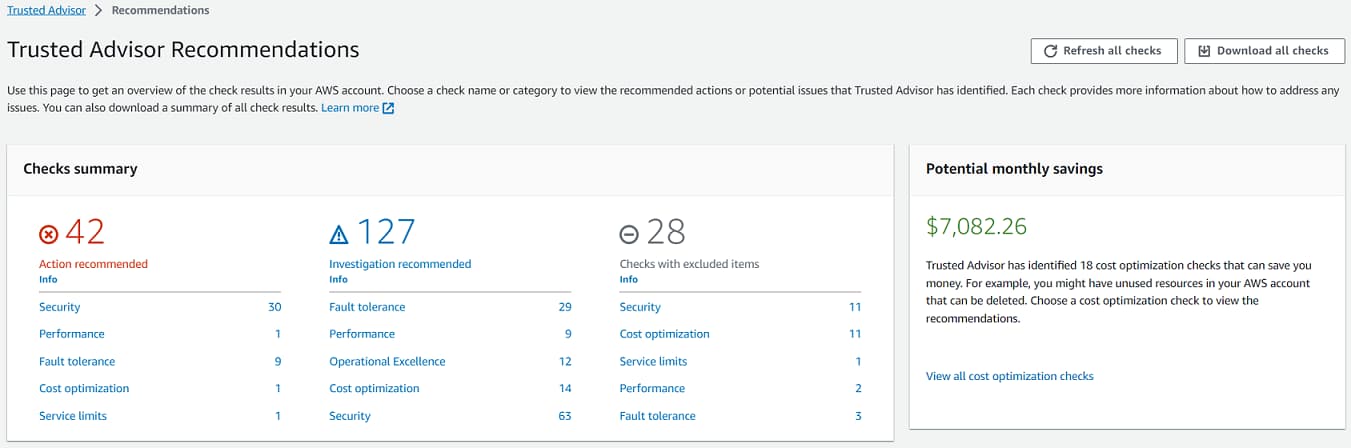
Source: AWS Documentation
However, note that if your AWS resources go down while on the Basic Support Plan, you won’t be able to report or troubleshoot an issue to a cloud support associate with this plan.
Business Support+ Plan for production workloads on AWS
The Business Support+ Plan costs at least $29/month/user (or 9% of charges up to $10K) and is meant for organizations running production workloads, offering:
-
24/7 support via email, chat, and phone with cloud support engineer access
-
AWS Support API for automating interactions with Support Center and Trusted Advisor
-
Use-case-based architectural reviews
-
Third-party software support for Amazon EC2 instance OSes and configurations
The Business Support+ Plan provides 24/7 access to customer service, technical support, and some architectural guidance. General guidance is answered in less than 24 hours, system-impaired issues in less than 12 hours, production system-impaired issues in 4 hours, and mission-critical system outages in less than 30 minutes.
Enterprise Support Plan for business-critical applications and workloads
The Enterprise Support Plan costs at least $5,000/month (10% of charges up to $150K) and is designed for large-scale enterprises, offering:
-
Dedicated technical account manager
-
Architecture service reviews, proactive security reviews, and a personalized strategic support plan
-
Access to AWS Trusted Advisor Priority, AWS Countdown Event Management (for infrastructure event management), and AWS Security and Incident Response
-
Regular business reviews with experts to ensure your infrastructure meets the AWS Well-Architected pillars and support is effective
Response times for the Enterprise Support Plan are less than 24 hours for general guidance, 12 hours for systems impaired, 4 hours for production systems impaired, 1 hour for production systems down, and less than 15 minutes for a mission-critical system being down.
Unified Operations Support Plan for high-resilience mission-critical use cases
The Unified Operations Support Plan costs at least $50,000 per month (10% of charges up to $1M) and is suited for mission-critical workloads that need increased resilience and specialized expertise, offering:
-
Designated technical account manager, domain specialist engineers, and incident management engineers
-
24/7 proactive workload monitoring
-
Continuous architecture service reviews, critical workload review, proactive security reviews, proactive cloud monitoring, and events and launch support.
-
AWS Security Incident response, AWS Countdown Premium, AWS Incident Detection and Response, and infrastructure event management.
Response times for the Unified Operations Support Plan are less than 24 hours for general guidance, 4 hours for a production system impaired, 1 hour for a production system down, and less than 5 minutes for a mission-critical system being down.
What happens after an AWS support case submission?
Once you submit a ticket in the AWS Support Center console, you should expect to hear from a customer support representative or technical staff within your plan’s allotted response time.
You’ll then work with the staff (via your designated support channel) to provide any additional information beyond what’s listed on your ticket. This results in either guidance and information for troubleshooting the issue or escalating the problem to higher-level technical support.
This process then continues until you can resolve the issue and mark the ticket as closed.
AWS contact methods and availability
Across all plans, Amazon Web Services offers various contact methods for support through their support center, including:
-
24/7 web, chat, and email support
-
AI-powered troubleshooting
-
AWS Support API
-
AWS Support App
What AWS support does not include
AWS support primarily provides troubleshooting and issue guidance for its own portfolio of products. This means that AWS support does not extend to:
-
Custom code development or debugging: If you have any issues with custom or non-AWS code, you will need to fix it internally or seek help outside of AWS support. Its experts offer guidance for infrastructure issues, not maintaining customer code or fixing flawed application logic.
-
System administration tasks: AWS support does not require remote access or hands-on keyboard assistance; instead, it provides troubleshooting via guidance and recommendations. It also does not have engineers perform regular system or server administration tasks. Any recommendations are purely as part of an advisory role.
-
Third-party software support: You can only access AWS support for third-party software with specific applications on Amazon EC2 instances, web servers, databases, and infrastructure components. This includes Linux, MySQL, PostgreSQL, Apache, and Nginx.
DigitalOcean’s support plans generally mirror AWS when it comes to custom code and system administration tasks, but it does offer some third-party software support via documentation.
Our AWS vs. DigitalOcean comparison breaks down how DigitalOcean’s streamlined developer experience and core cloud services contrast with AWS’s vast, enterprise-grade ecosystem. It’s a helpful guide to determine which platform aligns better with your team’s workflows, operational overhead, and day-to-day needs as you build and grow.
AWS support versus service SLAs
When it comes to understanding AWS service level agreements (SLAs), it’s important to understand associated misconceptions to avoid unrealistic support expectations, which include:
-
Application SLAs vs AWS Service SLAs: There is a distinction in Amazon’s responsibility when it comes to applications vs. AWS services, and they are not interchangeable. Just because AWS services might offer 99.9/99.99% uptime does not mean the application has the same SLA requirements or availability. AWS service SLAs cover a single managed service, not application logic, integrations, or orchestration tools. Application SLAs cover all dependencies, application code, network paths, and third-party services. Imagine a web application that relies on an EC2 instance (99.99% SLA), a load balancer (99.99% SLA), and an RDS database (99.95%), all running on AWS and each meeting its own uptime commitment. Because the application only works when all dependencies are available simultaneously, for a combined application uptime of 99.93%, its real-world uptime can be lower than that of any single service’s SLA. As a result, users may experience more downtime than expected, even when AWS has met every individual service guarantee. The same can be true for other vendors.
-
Regional scope: Most AWS SLAs apply to a specific AWS region, not necessarily a specific instance or global deployment. This means if you deploy an AWS service or EC2 instance within multiple regions, the SLAs can vary between regional deployments.
-
Exclusions: Like many SLAs, they do not cover issues or outages caused by factors outside of AWS’s control, including individual application or infrastructure configurations, not adhering to best practices for AWS services, or regional internet outages.
When to choose an AWS alternative like DigitalOcean
AWS can offer a lot of benefits for organizations and developer teams—but it doesn’t automatically mean it’s the best choice for your team. You might decide to choose an AWS alternative like DigitalOcean if:
-
You want to quickly spin up your infrastructure for a project and need an intuitive user interface that can get you online without the need for cloud configuration or extensive cloud expertise. This is also applicable to prototyping and development workflows and projects.
-
You’re running simple web applications and simple services with conventional architectures that can easily be run with DigitalOcean Droplets, object storage, and a managed database.
-
You have a cost-sensitive project where it’s beneficial to have transparent pricing that is straightforward to forecast, reducing the potential for “surprise” charges.
-
You want reliable infrastructure that can easily scale with your team’s needs as you grow and can support business expansion. In addition to straightforward, scalable infrastructure, you also get a no-fuss developer experience and a wide variety of community tutorials and documentation.
DigitalOcean support offerings
DigitalOcean offers four support plans:
-
Starter - Free. Included for all customers and designed for general guidance and troubleshooting. Average response time of less than 24 hours, email-based support from customer support staff, and average resolution time of 48 hours.
-
Developer - $24/month. Designed for development, testing, and non-production workloads. Average response time of less than 8 hours, email-based support from customer support staff, and average resolution time of 16 hours.
-
Standard - $99/month. Suited for production workload deployment and maintenance. Average response time of less than 2 hours, email-based and live chat support from high-level technical staff, and average resolution time of 4 hours.
-
Premium - $999/month. Created for businesses with large customer bases and mission-critical applications. Average response time of less than 30 minutes, access to high-level technical staff and an assigned technical account manager, and an increased API limit. Support channels include a dedicated Slack channel, live chat, video calls, and email.
DigitalOcean support plans include published average resolution times for each tier, which can help teams plan workloads, whereas AWS focuses its service commitments solely on initial response targets.
In addition to these dedicated support plans, DigitalOcean offers a wide range of product documentation, community tutorials, and YouTube videos that can help address potential issues and provide easily accessible advice.
Evaluating options beyond AWS for your startup? App Platform delivers a simpler, more predictable way to build and scale apps—highlighting ease of use, streamlined deployment, and cost predictability as key reasons teams choose DigitalOcean.
Role of technical account managers (TAMs) in support
Technical account managers (TAMs) play a crucial role in delivering efficient support response times and providing proactive guidance. TAMs collaborate with customers to understand their requirements and provide tailored support, helping to expedite issue resolution and minimize overall response time. AWS offers a technical account manager for only their highest levels of support (Enterprise and Unified Operations).
DigitalOcean not only provides technical account managers for Premium Support Plans, but also access to technical staff at every level:
-
The Starter and Developer Plans include customer support staff available for general guidance.
-
The Standard Plan includes high-level technical staff expertise.
-
With Premium Support Plans, you can access high-level technical staff, as well as dedicated business and technical advisors.
For those who do not subscribe to AWS’s higher support tiers, issues are handled by cloud support associates, who may not have as much technical background on cloud infrastructure setups as a technical account manager.
AWS offers AI-based troubleshooting, which may not fully understand your issues and requires some time to gain the necessary context for effective troubleshooting. It also requires a level of self-service for navigating documentation, which can affect overall support quality or create frustration.
What is a designated technical account manager?
A designated technical account manager (TAM) serves as your dedicated technical point of contact, providing advocacy, strategic technical guidance, cloud support engineer access, and building and maintaining relationships with customers. They assist customers in planning and building solutions using best practices, proactively addressing issues, and ensuring customer satisfaction.
A technical account manager offers best practices, new feature recommendations, and performance improvement suggestions to optimize your cloud services usage. They provide expertise and tailored recommendations to ensure the successful adoption and implementation of new features.
TAMs also help you understand the potential benefits and use cases of new features, enabling you to use their expertise to achieve desired outcomes. Because of this wide range of benefits, TAMs can be extremely beneficial to small and large organizations alike; however, AWS enterprise cloud support models only provide access to TAMs for those willing to pay AWS support fees each month for the Enterprise or Unified Operations Plans.
Looking for more than infrastructure? Servd Hosting relies on DigitalOcean’s Premium Support—including a dedicated account manager and a designated Slack channel—to get fast, expert help and resolve issues quickly as their platform scales, keeping their team lean and focused on what matters.
Do AWS support response times meet customer expectations?
While AWS publicly shares target response times, it is not a guarantee of when users will receive a response. AWS does not offer an SLA for support responses; therefore, customers are not entitled to compensation for longer wait times. This also creates a disparity between AWS and customer goals, as Amazon does not need to meet specific resolution requirements, leaving some users wondering how to effectively escalate tickets. While AWS aims to respond to questions in a timely manner, customers on lower-tier plans can experience longer response times from AWS support.
DigitalOcean offers transparent, tiered pricing that can provide greater cost predictability and lower entry points for startups and digital-native enterprises compared to AWS’s usage-based support fees.
AWS isn’t the only hyperscaler cloud provider with complicated support plans and pricing. Get specific insights on how to understand Azure pricing and ways to optimize your monthly invoice.
DigitalOcean vs AWS support comparison
When it comes to pricing, scope, and response times, here’s how DigitalOcean compares against AWS.
Pricing
One of the biggest differences between AWS and DigitalOcean support centers on how pricing works. AWS support is usage-based, meaning costs scale with your monthly AWS bill. They can grow quickly as your infrastructure grows, especially at the Business or Enterprise tiers. DigitalOcean offers flat-rate pricing, making it simple to budget support costs.
Support scope and depth
AWS offers very broad and deep support, especially at higher tiers, primarily covering AWS services and some guidance for third-party software on AWS, along with proactive architecture service reviews and security support for higher-tier support plans. DigitalOcean’s support is more focused on helping customers effectively use DigitalOcean’s core cloud and AI services.
While AWS is ideal for AWS products and deep architectural involvement or multi-service guidance, DigitalOcean is often a better fit for teams that want straightforward support without navigating a massive service catalog.
Response and resolution times
AWS uses severity-based response targets, which means critical production issues can get attention in minutes on higher tiers, while less urgent issues typically take longer. DigitalOcean’s response times are tied directly to your support plan, with Premium customers receiving responses in as little as 30 minutes.
In practice, AWS offers faster guarantees for the most critical outages for its most expensive plans, but even the response time difference for support plans is between 5-10 minutes. However, there is no guaranteed incident resolution time with AWS support plans. Both providers focus on response time rather than guaranteed resolution time, though DigitalOcean notably publishes average resolution times, which can help teams better plan workloads.
Support channels
AWS offers several communication options, including 24/7 phone, chat, and ticket-based support on paid plans, which can be important for teams that prefer real-time escalation during incidents. DigitalOcean relies on tickets and chat, with Premium customers gaining access to a dedicated Slack channel, video calls, and dedicated technical and business staff. With DigitalOcean, many customers appreciate the direct, async communication style and the ability to speak with the same support engineers over time. You can add convenient communication channels for your team via plan upgrades.
Considerations and trade-offs
AWS’s biggest drawback can be its cost and complexity—support fees increase as usage grows, and navigating support tiers can feel overwhelming for smaller teams. DigitalOcean’s main limitation can be its scope: its support focuses primarily on its core platform offerings and doesn’t include proactive services, reviews, or guidance outside of the Premium level.
Neither provider will debug your application code for you, but AWS tends to focus more on Amazon products, while DigitalOcean emphasizes simplicity, approachability, and cost transparency. The right choice largely depends on whether you value breadth and scale or clarity and predictability.
Note: Information current as of January 2026 and subject to change.
AWS support response time FAQs
What cloud provider offers the best support for beginners?
DigitalOcean offers straightforward, transparent pricing for its users, along with customer support staff and issue prioritization, starting at $24/month with its Developer plan. AWS has its Basic free option and Business Support+ starting at $29/month, and customers can get more technical support with an Enterprise or Unified Operations plan. AWS does have percentage-based billing, which can become expensive and hard to forecast for your budget.
What is AWS’s support response time?
AWS’s support response time depends on your selected plan and the type of issue you’re dealing with. For general guidance, Business and Enterprise support offers a response in 24 hours. For mission-critical issues, response times are less than 15 minutes for Enterprise plans and less than 30 minutes for Business plans.
Does AWS guarantee resolution times?
No, AWS does not guarantee resolution times; instead, it shares target response times on its support plan pages. In contrast, DigitalOcean shares average resolution times on its support plan page, with a range of 2-48 hours for average issue resolution, depending on the plan.
How fast is AWS Enterprise Support? Response times for the Enterprise Support plan depend on the incident severity level and selected support plan. It is less than 24 hours for general guidance, 12 hours for systems impaired, 4 hours for production systems impaired, 1 hour for production systems down, and less than 15 minutes for a mission-critical system being down.
Does AWS support cover architecture reviews?
Yes, AWS provides architectural reviews (infrastructure assessments that identify critical issues or improvement areas) and guidance for Enterprise and Unified Operations plans. For Enterprise Plans, these reviews are offered on an as-needed basis and provide guidance based on installed business applications. Unified Operations subscribers receive them on a rolling, continuous basis with domain specialists.
Build with DigitalOcean’s GradientTM AI Platform
DigitalOcean Gradient Platform makes it easy to build and deploy AI agents without managing complex infrastructure. Build custom, fully-managed agents backed by the world’s most powerful LLMs from Anthropic, DeepSeek, Meta, Mistral, and OpenAI. From customer-facing chatbots to complex, multi-agent workflows, integrate agentic AI with your application in hours with transparent, usage-based billing and no infrastructure management required.
Key features:
-
Serverless inference with leading LLMs and simple API integration
-
RAG workflows with knowledge bases for fine-tuned retrieval
-
Function calling capabilities for real-time information access
-
Multi-agent crews and agent routing for complex tasks
-
Guardrails for content moderation and sensitive data detection
-
Embeddable chatbot snippets for easy website integration
-
Versioning and rollback capabilities for safe experimentation
Get started with DigitalOcean’s Gradient Platform for access to everything you need to build, run, and manage the next big thing.
DISCLAIMER: Any references to third-party companies, trademarks, or logos in this document are for informational purposes only and do not imply any affiliation with, sponsorship by, or endorsement of those third parties.
About the author

Jess Lulka is a Content Marketing Manager at DigitalOcean. She has over 10 years of B2B technical content experience and has written about observability, data centers, IoT, server virtualization, and design engineering. Before DigitalOcean, she worked at Chronosphere, Informa TechTarget, and Digital Engineering. She is based in Seattle and enjoys pub trivia, travel, and reading.
Start building today
From GPU-powered inference and Kubernetes to managed databases and storage, get everything you need to build, scale, and deploy intelligent applications.
